Student Tracker
Student Tracker helps Philippine law students turn their current subjects, confidence levels, and study activity into a practical Study Readiness view.
It is designed for law students who want to know where they may need more study evidence. It is not for predicting grades or replacing personal judgment.
Student Tracker is a study-readiness guide. It is not a grade predictor, recitation guarantee, or legal advice tool.
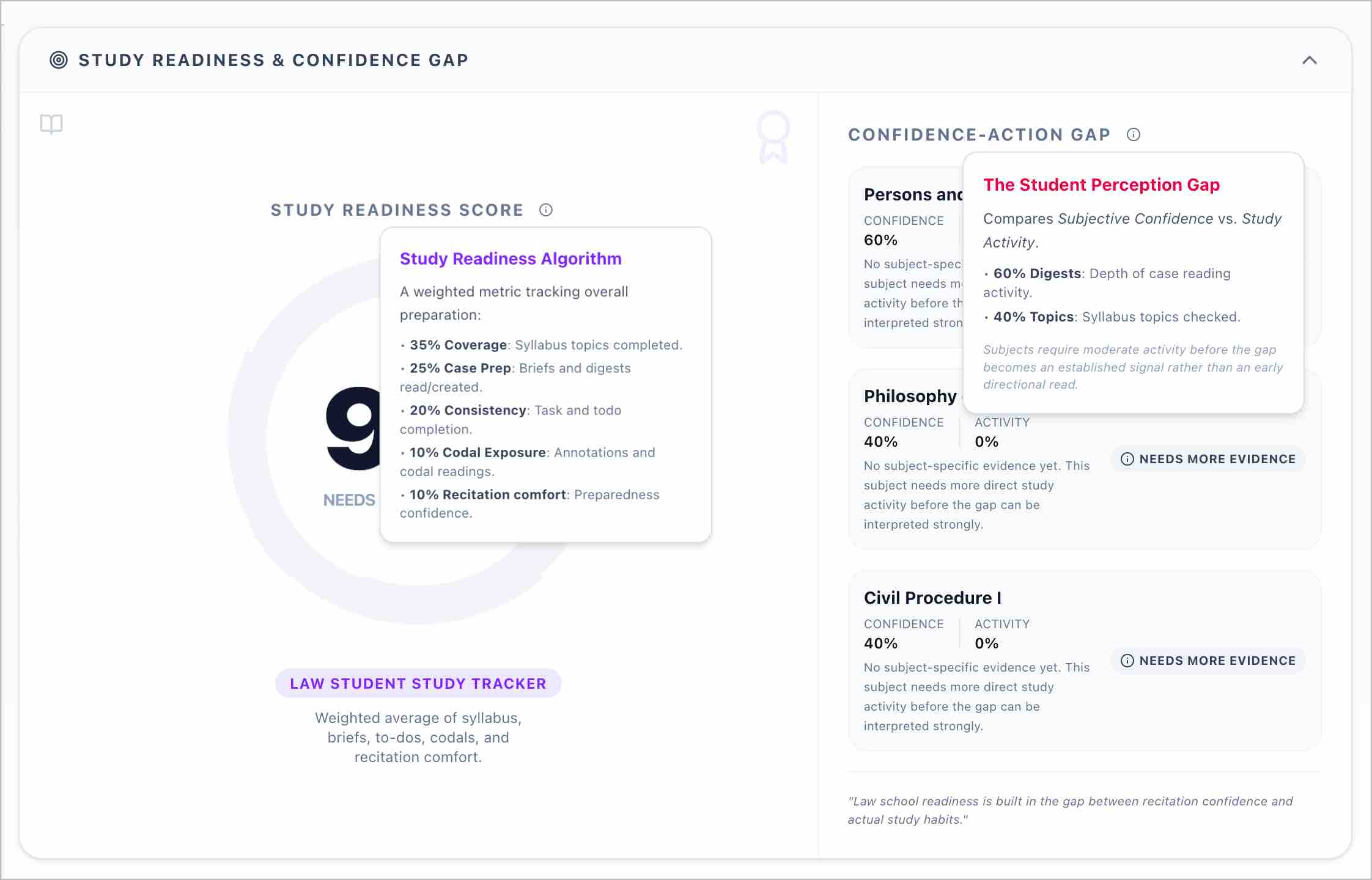
What Student Tracker shows
Student Tracker has two main parts:
- Study Readiness Score
- Confidence-Action Gap
You can open it from the app at /student-tracker. If your account has not completed the Student Study Profile yet, the app will send you to /onboarding/student-calibration so you can finish the required setup.
The tracker is for profiles that match the Law Student study workflow. If your profile is not eligible, update your onboarding answers or ask support to check your account setup.
Study Readiness Score
The Study Readiness Score is a directional signal based on your Student Study Profile and available study activity.
The score is computed from your profile and available study activity signals, including study coverage, case preparation, tracker consistency, codal engagement, and recitation comfort. Read it as a practical study guide, not as a mathematical forecast of school performance.
Common score labels include:
- Strong Study Signal: your available activity signals are stronger and more consistent.
- Building Momentum: you have meaningful progress, but some areas may still need reinforcement.
- Needs More Evidence: the system does not yet have enough direct study activity to give a stronger signal.
Low evidence does not mean failure. It means the system needs more direct study activity before giving a stronger signal.
Confidence-Action Gap
The Confidence-Action Gap compares your self-reported subject confidence against activity signals in the app.
Use it to spot where your feeling about a subject may not yet match your study record:
- high subject confidence plus low activity may mean the subject needs more evidence before you rely on that confidence
- low subject confidence plus some activity may show a focus area where repetition could help
- confidence and activity moving together usually gives a more stable signal
The gap becomes more useful as you use the app for actual study activity, such as reading cases, checking syllabus topics, using codals, completing todos, and tracking focused study time.
Why "Needs More Evidence" appears
A subject may show Needs More Evidence when Student Tracker does not yet have enough direct activity to interpret the subject strongly.
This can happen when:
- the subject was recently added to your current subjects
- your subject confidence was rated, but there is little matching study activity yet
- you have used the app generally, but not enough activity is tied to that subject
- your selected subject maps into a broader tracker area and the signal is still thin
To improve the signal, keep your current subjects updated and use the shared study tools while reviewing.
Setting up your Student Study Profile
The Student Study Profile powers Student Tracker. It asks for:
- academic stage
- primary goal
- current subjects
- subject confidence
- recitation comfort
- daily study hours or variable study style
You can update these from Edit Study Profile in Student Tracker or by opening /onboarding/student-calibration.
Choosing current subjects
The current subjects step is split into a quick foundational step and a more specific subject search.
Step 3: Foundational subjects
Step 3 shows first-year or foundational subjects:
- Persons and Family Relations
- Obligations and Contracts
- Criminal Law I
- Constitutional Law I
- Statutory Construction
- Legal Research and Writing
- Other (select specific subjects next)
Select the subjects you are currently taking. If your subject is not listed, choose Other.
Step 3A: Other subjects
Choosing Other opens Step 3A, where you can search more specific subjects, such as:
- Philosophy of Law
- Legal Forms
- Clinical Legal Education
- Legal Ethics
- Evidence
- Civil Procedure
- Taxation
- Labor Law
- Commercial Law subjects
If your typed subject exactly matches a catalog subject or alias, Student Tracker saves the catalog subject. If it does not match yet, the app may save it as a pending suggestion. Pending suggestions do not immediately become global catalog subjects and do not immediately require subject confidence ratings.
To remove a selected subject, return to the subject selection step and use the remove button on the selected subject chip.
How Student Tracker uses your subjects
Your selected current subjects help filter and personalize the tracker.
For now, some law school subjects are grouped under broader tracker areas so the app can connect them to existing study activity:
- Persons and Family Relations, Obligations and Contracts, and Property connect to the Civil Law area
- Criminal Law I connects to the Criminal Law area
- Constitutional Law I connects to the Political Law area
- Evidence and Procedure connect to the Remedial Law area
- Taxation connects to the Commercial Law area
- Legal Ethics and related skills subjects connect to the Remedial Law area
This grouping does not mean your law school subject is identical to the broader area. It only helps Student Tracker organize available study signals until more subject-specific tracking is available.
Shared study tools
Student Tracker connects to shared study utilities where applicable:
- Study Timer for actual focused study duration
- Todos for assignments, reading lists, and study tasks
- Calendar for study plans, class schedules, and deadlines
- Materials for syllabus PDFs, handouts, and notes
These are shared study tools, not Bar Tracker-only tools. In the Student Tracker surface, use them for law school study activity and recitation preparation.
Recommended workflow
- Complete the Student Study Profile.
- Select your current subjects.
- Rate subject confidence honestly.
- Use study tools while reviewing.
- Revisit the Confidence-Action Gap after real study activity.
- Focus first on subjects marked Needs More Evidence or subjects where confidence feels low.
- Update your profile when semester subjects change.
The best use of Student Tracker is weekly. Review your signals, choose one or two concrete focus areas, then study with enough consistency for the tracker to learn from your activity.
What Student Tracker does not do
Student Tracker does not:
- predict grades
- guarantee recitation performance
- measure professor evaluation
- replace professor syllabi
- replace codal reading or case reading
- predict Bar exam performance
- provide legal advice
Use it as a study-readiness guide beside your professor's syllabus, assigned readings, codal work, and personal study plan.
Troubleshooting
Why is my score low?
A low score usually means the tracker has limited study activity, low consistency, or low confidence-related signals. Start by checking whether your current subjects are correct, then log actual study activity through the shared tools.
Why does a subject say Needs More Evidence?
The system may not have enough direct subject activity yet. Read cases, use codals, complete todos, and update syllabus progress where available.
Why are some selected subjects grouped under broader areas?
Some specific law school subjects currently map to broader tracker areas. This keeps the dashboard useful while the app continues to support more subject-specific activity over time.
Why is my custom subject not immediately shown as a full catalog subject?
Unknown typed subjects may be saved as pending suggestions. They do not immediately become global catalog subjects because the subject catalog must stay clean and consistent for all users.
How do I remove a selected subject?
Open Edit Study Profile, return to the current subjects step, and remove the subject from the selected subject chip list. If the subject came from Step 3A, you can remove it from the selected subjects area there.
Related tools
- AI Suite for legal research and AI-assisted study support
- Personal Documentation Management for organizing digests, folders, tags, and notes
- Bar Candidate Toolkit for the older shared-tool manual that still documents some timer, tracker, and practice surfaces
Some related manual pages still use Bar-focused wording because those shared tools started in the Bar review workflow. Student Tracker uses the shared tools in a law student context: current subjects, study activity, subject confidence, recitation comfort, and study habits.