The Case Digesting Workflow
Importing and Searching Case Materials
The first step in any digestion task is identifying the source material. Case Digestor provides two primary paths for document input:
- The Jurisprudence Library: Access a pre-indexed database of thousands of Philippine Supreme Court decisions. You can search by G.R. number, party names, or specific legal doctrines.
- Custom Case Upload: For recent decisions or specific documents not yet in the central library, users can copy and paste text or upload plain text files directly into the digester interface.
Practical Tip: When searching the Jurisprudence Library, use keywords like "Illegal Dismissal" or "Naturalization" to see conceptual matches even if you don't have a specific citation.
Dedicated Legal Search
For comprehensive research beyond simple digestion, the Legal Search feature (available at /search) provides expanded capabilities:
- Semantic Intelligence: Find cases based on legal concepts and fact patterns, not just keyword matches.
- Result Previews: View relevant excerpts and case metadata before committing to a full read.
- Credit Usage: Each search query consumes 1 credit.
Actual costs and plan details may vary depending on your individual subscription.
Smart Tagging & Classification
Case Digestor eliminates manual data entry by intelligently analyzing the case text to automatically determine its legal context. Upon processing, the system generates a comprehensive metadata card:
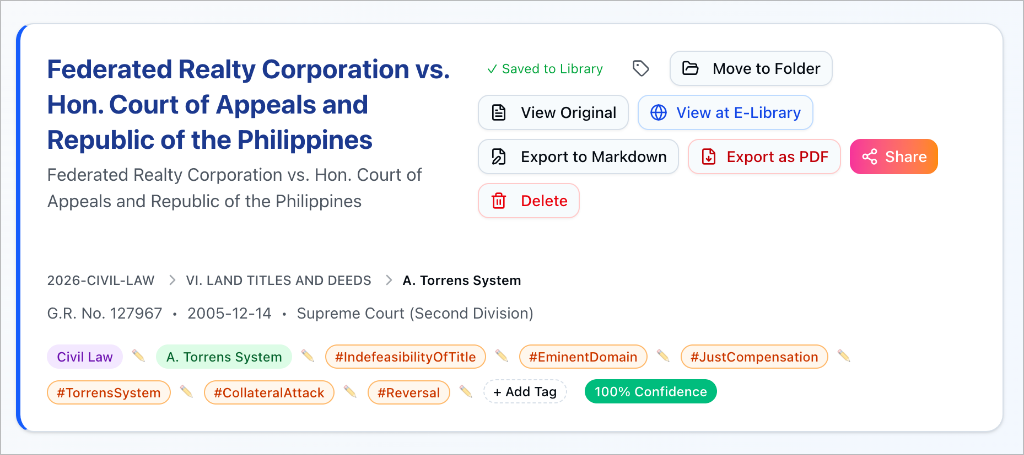
- Syllabus Mapping: The AI automatically categorizes the case under the correct Bar Subject and specific Topic (e.g., Civil Law > Land Titles and Deeds > A. Torrens System).
- Smart Tags: Key legal concepts (e.g., #IndefeasibilityOfTitle, #EminentDomain) are extracted to facilitate cross-referencing.
- Confidence Score: A percentage indicator showing the AI's certainty in its classification (e.g., 100% Confidence).
Manual Override & Smart Search
While the AI successfully categorizes the majority of cases, legal nuances—or decisions covering multiple subjects—may require human refinement.
- Edit Topic (Pen Icon): Clicking the pencil icon next to the mapped topic opens a smart search interface.
- 2026 Bar Syllabus Integration: You can search for and select any specific topic from the latest Bar Syllabus to manually correct or update the classification. This ensures your personal library remains organized exactly according to your study needs.
Generative Digestion
Once you have your source material (file or URL), the AI engine takes over to transform the raw text into a structured digest:
- Input Source: Drag and drop a PDF/text file or paste a link from the E-Library.
- Automated Processing: The system automatically extracts text (formatting OCR if necessary) and prepares it for analysis.
- Generation: The AI analyzes the decision in the background. Note: Credits are consumed immediately upon successful generation.
- Review & Save: Once complete, you will see a 'Digest Generated!' confirmation. You can then preview the result and explicitly Save to Library to organize it into your folders.
Reviewing Generated Outputs
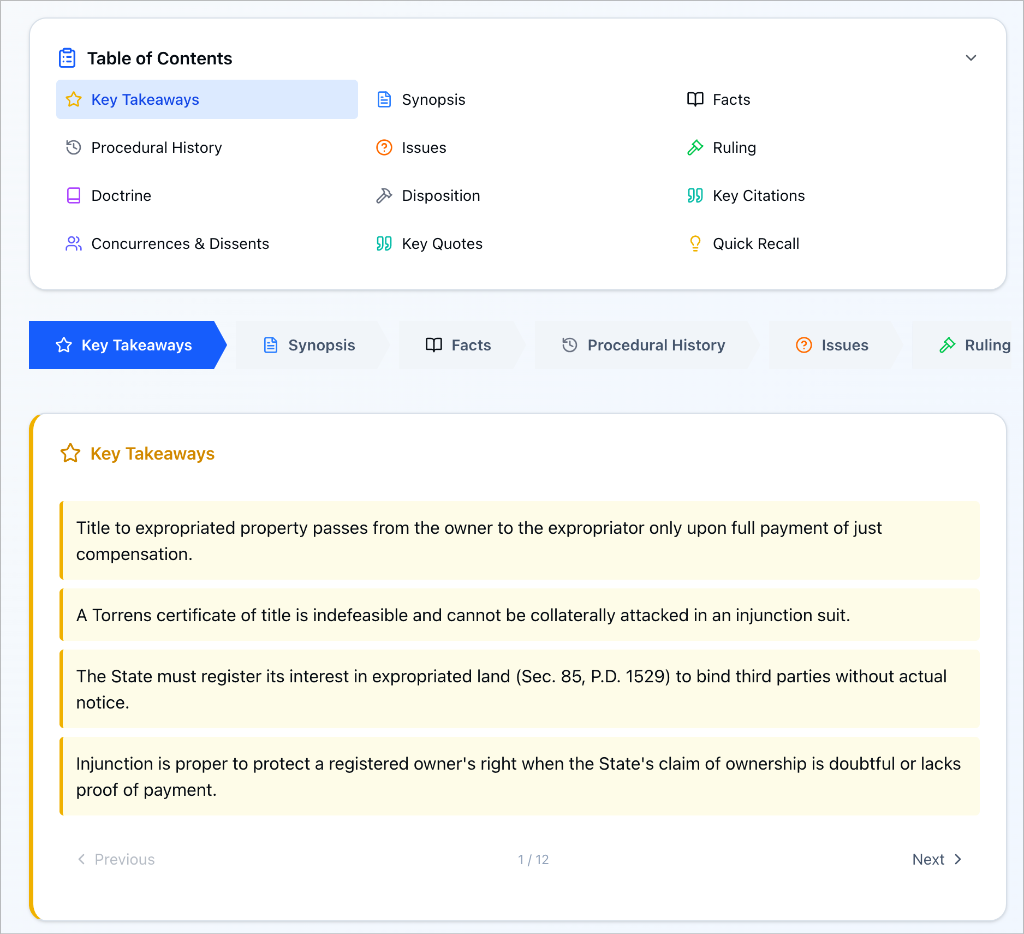
A finalized digest is presented in a structured, 12-point section layout designed for comprehensive legal analysis.
Navigation & Layout
- Table of Contents (TOC): A collapsible menu at the top allows you to instantly jump between specific sections (e.g., from Key Takeaways directly to Ruling).
- Sequential Flow: Content is organized logically with arrow indicators and "Next/Previous" buttons at the bottom of each card, guiding you through the full legal narrative.
Comprehensive 12-Point Analysis
Every digest is broken down into modular sections including:
- Key Takeaways: High-level summary points.
- Synopsis: Brief overview of the case.
- Facts: Detailed chronological formatting.
- Procedural History: How the case moved through lower courts.
- Issues: The specific legal questions resolved.
- Ruling: The court's final decision.
- Doctrine: The controlling legal principle.
- Disposition: The final order (e.g., Affirmed, Reversed).
- Key Citations: Referenced cases and statutes.
- Concurrences & Dissents: Alternative judicial opinions.
- Key Quotes: Verbatim meaningful passages.
- Quick Recall: Mnemonic aids for memory retention.
Refining, Saving, and Exporting
The workflow doesn't end with generation; the platform allows you to treat the digest as a living document:
-
Refinement: Use the built-in editor to add personal notes, highlight specific passages, or correct nuances based on your own reading.
-
Organization: Save the digest to a specific Folder within your workspace for easy retrieval (see Creating Folders).
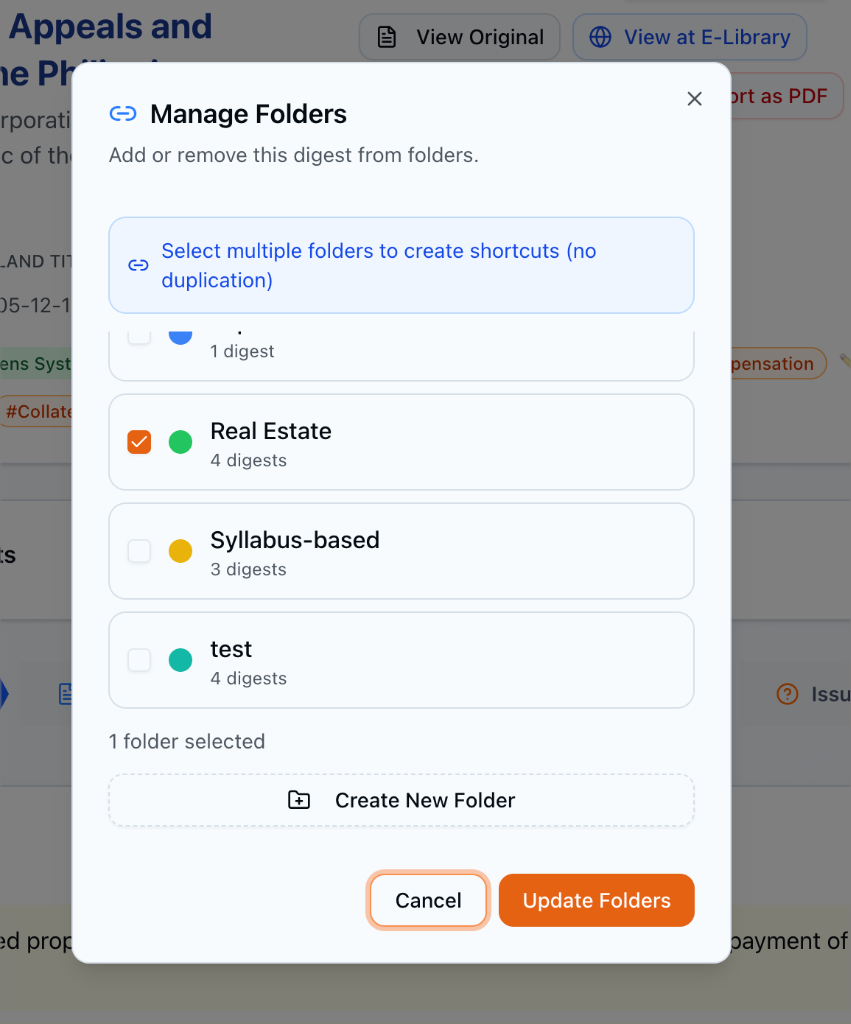
- Manage Folders: Click "Move to Folder" to open the management interface.
- Shortcuts: Select multiple folders to create reference shortcuts, allowing the same digest to appear in different contexts (e.g., both "Civil Law" and "Remedial Law").
- Instant Creation: Create new folders on the fly if a suitable one doesn't exist.
-
Bookmarking: Mark landmark cases as Favorites for instant access from the sidebar.
-
Portability: Use the Export button to download the digest as a PDF or copy the formatted text to your clipboard for use in a pleading, memorandum, or law school digest pool.