Resource Management
What This Page Covers
This page is the canonical user guide for:
- plan access behavior
- credit-aware features
- usage quotas and limits
- practical budgeting workflows
If you see conflicting wording in other pages, follow this page first.
How the Credit Economy Works
Case Digestor uses a credit-aware model for computationally heavy AI workflows. Some interactions consume credits, while others are mostly organizational or read-only.
For the current in-app explanation and plan calculator, open /credits. The values shown in the app are the source of truth for current plan configuration. This manual explains the general concepts; the app shows the live plan examples and calculations.
Typical pattern:
- AI generation actions are usually credit-sensitive.
- Saved-content review and planning actions are usually non-billable.
- AI chat may be both credit-aware and quota-limited.
Exact values are controlled by your current plan and runtime configuration, so they can change over time.
Typical Action Behavior
| Action | Typical economy behavior |
|---|---|
| Generate AI digest | Usually consumes credits |
| Legal search / AI-assisted retrieval | Usually credit-aware |
| Mock Bar question generation | Usually credit-sensitive |
| AI chat in legal assistant | May consume credits and may also be quota-limited |
| Foldering, tagging, annotations, and general organization | Usually non-billable |
| Reading already saved digests and prior results | Usually non-billable |
Treat this table as behavior guidance, not fixed pricing. Current account values shown in-app are the source of truth for your session.
Plans, Access, and Eligibility
Feature access and billing behavior depend on your active account state:
- anonymous browsing state
- registered free state
- paid plan state
Some premium workflows additionally require minimum eligibility at runtime (for example, minimum available credits before launching certain sessions).
Credits, Access, and Quotas are Different
Case Digestor distinguishes between three distinct layers of feature entitlement:
- Access (Permission Scope): Governs which tools you can open and use.
- Credits (Usage Capacity): Governs how much usage is allowed for AI-powered or premium actions.
- Quotas or Rate Limits: Control how often certain actions may be used in a specific time window.
When product copy or marketing materials mention "full access" or "unlimited access", it refers strictly to the Access Rights Layer (feature availability), not infinite consumption or unlimited credits.
It does not mean:
- unlimited credits
- no depletion
- no throttling
- no rate limits
- infinite AI generation
Why We Do Not Use "Unlimited Credits"
For AI-powered products, "unlimited credits" is not technically accurate because:
- AI actions have marginal cost (compute and tokens per call).
- Abuse controls are required to protect reliability and performance for all users.
- Capacity controls still apply (for example, quotas or rate limits).
In practice, products that market "unlimited" usually mean unmetered usage only within fair-use boundaries, not literal infinity.
For consumer clarity and compliance posture (including Philippine consumer-protection expectations), this manual does not treat any credit-metered or rate-limited flow as "unlimited credits."
Canonical representation:
- Full access to all tools, with metered usage via credits and rate limits.
Where to Verify Current Values
Use these in-app surfaces before high-volume study sessions:
- Profile: Current balance and usage context. Shows the live credit balance.
- Get Credits: Available top-up and plan paths.
- The
/creditsGuide: The centralized guide for credit education and interactive plan calculator examples. - Feature prompts/tooltips: Runtime gating and quota messages in active tools.
- Chat quota indicators: Per-message behavior and quota status during AI chat.
Quotas vs Credits
Credits and quotas are related but not identical:
- Credits represent your spendable AI usage budget.
- Quotas cap certain activity rates over a time window.
A request can fail because of either condition, so check both when troubleshooting blocked actions.
Efficient Usage Strategy
- Search/reuse first: Check saved materials before generating new AI outputs.
- Plan before spend: Use tracker and management tools to target high-yield topics.
- Batch expensive work: Group related AI tasks in focused sessions.
- Watch runtime prompts: Follow in-product eligibility and low-balance cues.
- Prioritize critical outputs: Use credits where they improve decision quality the most.
Illustrative Example (Not a Fixed Guarantee)
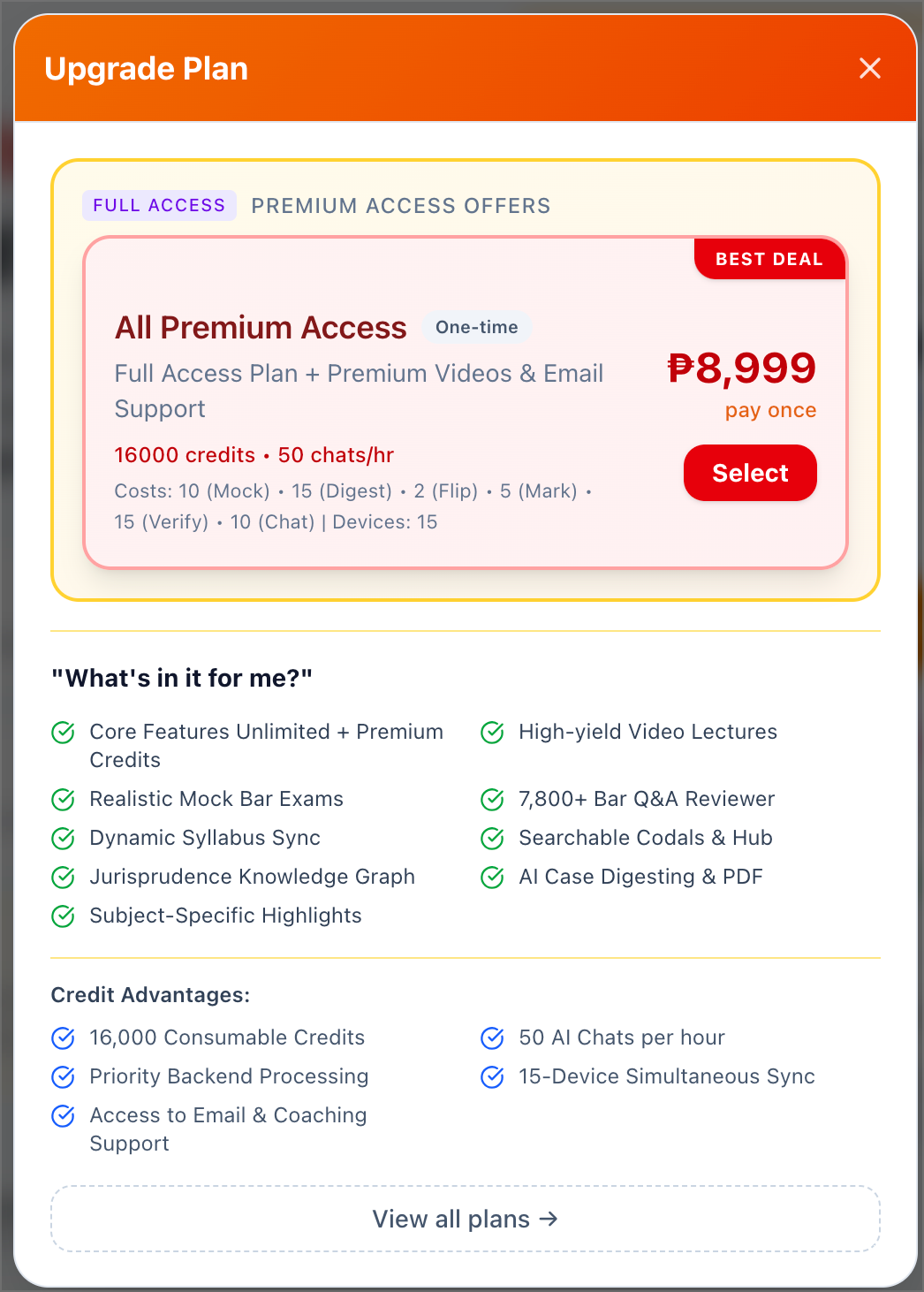
Example only for All Premium Access Plan:
- consumable credits: 16,000
- chat quota: 50 chats/hour
Per-action credit costs shown in the snapshot:
| Action | Cost per action |
|---|---|
Mock Bar question (Mock) | 10 credits |
AI case digest (Digest) | 15 credits |
Flip (Flip) | 2 credits |
Mark (Mark) | 5 credits |
Verify (Verify) | 15 credits |
AI chat message (Chat) | 10 credits |
If all 16,000 credits were spent on only one action type:
| Action | Max full actions from 16,000 credits |
|---|---|
| Mock | 16,000 / 10 = 1,600 |
| Digest | 16,000 / 15 = 1,066 (with 10 credits remaining) |
| Flip | 16,000 / 2 = 8,000 |
| Mark | 16,000 / 5 = 3,200 |
| Verify | 16,000 / 15 = 1,066 (with 10 credits remaining) |
| Chat | 16,000 / 10 = 1,600 (also subject to 50 chats/hour) |
Scenario A: Mock Bar-focused only
If a user answers 20 Mock Bar questions/session at 3 sessions/week:
- weekly Mock usage =
20 x 3= 60 questions/week - weekly Mock credits =
60 x 10= 600 credits/week - runway =
16,000 / 600= 26.67 weeks (around 6.1 months)
Scenario B: Mixed-tool usage (more realistic)
If weekly activity includes:
60Mock questions8Digests70Flips30Marks20Verifies70Chat messages
Then:
- weekly credits =
(60 x 10) + (8 x 15) + (70 x 2) + (30 x 5) + (20 x 15) + (70 x 10) - weekly credits =
600 + 120 + 140 + 150 + 300 + 700= 2,010 credits/week - runway =
16,000 / 2,010= 7.96 weeks (around 1.8 months)
Nuance:
- "Core features unlimited/full access" describes feature availability, not infinite consumption.
- Mixed usage reduces runway faster than Mock-only usage.
- Chat usage is governed by both credits and the 50 chats/hour rate limit from the snapshot.
Use these standard formulas to calculate plan limits:
- Credits Used =
number of actions × credit cost per action - Remaining Credits =
included credits − credits used - Maximum Full Actions =
floor(included credits ÷ credit cost per action) - Weeks of Runway =
total credits ÷ estimated weekly credit use
This is planning guidance only. Final eligibility, rates, and costs always follow your live in-app configuration.
If You Hit a Limit
When an action is blocked:
- confirm available credits in Profile
- review active quota state in the relevant tool
- use Get Credits if you need immediate continuation
- continue with non-billable planning/review steps while waiting for reset or top-up